The short answer
List the full transition between homes, label estimates and deposits clearly, and check the cash required at each stage before booking the move.
General educational guide. Sources checked September 11, 2026. Examples are illustrative; amounts should be adjusted to your household. Read our disclosure.
A moving budget needs three totals: the costs you expect to pay, deposits that tie up money but may be returned, and a reserve for unresolved costs. Put a payment date beside every line. The amount needed before moving day can be larger than the eventual cost, especially when a new deposit is due before an old one comes back.
Start with your own documents and household needs. The checklist and examples below organize the move’s funding; they do not estimate current moving prices or determine your rights under a lease or moving contract.
Download the moving budget worksheet
Use the moving budget Excel workbook for calculations or the printable moving budget PDF for a manual plan.
The Excel workbook has 30 lines. Label each as a cost or a refundable deposit. Enter an estimate, cumulative confirmed payments, and the date the remaining payment is due. When a final total is confirmed, enter it in the final-amount field; a confirmed 0 replaces the estimate, while a blank keeps the estimate in use. Keep the source and any remaining questions with the item. The working totals can therefore contain both confirmed figures and estimates, identified on each row.
Enter the full move budget, including amounts already paid, separately from current unspent move cash. The funding target combines working costs, refundable deposit commitments, and the unspent contingency reserve. Budget headroom compares that target with your full budget. The cash check compares unpaid amounts plus the reserve with cash still available. An advance credited to a service belongs in that service’s paid-to-date field; adding another cost row would count it twice.
Set a manual as-of date and a deadline on or after it. The deadline check includes remaining payments due by that date, including overdue balances, and assumes each row’s entire unpaid amount is due on its entered date. Check the provider’s actual payment schedule separately. A shortfall of 0 in that check means enough cash for those listed amounts and the reserve; it does not verify later income, unlisted expenses, or the accuracy of an estimate.
The deposit total is a working commitment, not a ledger of deposits still held after refunds. Expected refunds never reduce the cash requirement. After an actual refund arrives, reflect it once in current unspent cash and reconcile the deposit in a separate record. If paid-to-date exceeds a row’s working amount, resolve the overpayment message instead of treating the excess as money available for another provider.
Complete input messages before using the summaries. Use the amber cells and keep calculated cells intact; use another copy after 30 lines. The PDF provides eight manual rows on one landscape US Letter page, with separate cost, deposit, funding-target, and headroom totals. It does not calculate the Excel cash checks. Neither version fetches quotes or sends payments.
Inventory the transition between homes
Create one worksheet covering preparation, moving day, and the first weeks after arrival. Use columns for item, amount, estimate source, payment date, amount already paid, remaining amount, and next action.
Check these groups:
- Moving service or rental: transport, packing help, equipment, mileage or fuel where applicable, and any services outside the initial price.
- Access and logistics: parking arrangements, stairs, elevators, storage, or an extra pickup that needs to be discussed with the provider.
- Packing: boxes, tape, protective materials, and anything you can already reuse.
- Travel and care: your own transportation, meals, overnight stays, and child or pet care if required.
- Housing transition: extra days of housing overlap, cleaning, and documented move-in charges.
- Deposits and setup: new housing or utility deposits, connection charges, and essential first-week purchases.
Keep regular household bills in your ordinary budget. If normal rent is already included there, add only an extra overlap amount to the move worksheet. Mark excluded costs explicitly so “not in this worksheet” does not become “free.”
Compare written estimates with the same scope
Give each provider the same inventory, locations, access details, services, and dates. A smaller-looking price is difficult to compare when one includes packing and another leaves it out. Note which items remain uncertain and who will confirm them.
For an interstate household move, FMCSA distinguishes a rate quote from a written estimate. It also distinguishes binding estimates from non-binding estimates, which do not guarantee the final charge. A binding estimate depends on the shipment and services covered; added items or changed circumstances can require an updated agreement.
Record the estimate type, its included services, the payment schedule, and accepted payment methods. Get changes documented before relying on a revised number. Do not treat an informal quote, a booking deposit, or the word “estimate” alone as a guarantee. FMCSA’s cited guidance concerns interstate moves; check the applicable guidance for a move within one state.
Separate deposits from costs you will not recover
A refundable deposit is money you need to provide even though it is not automatically a final expense. Label it separately, with its purpose and the terms you need to check. A nonrefundable fee belongs among planned costs. If a document is unclear, put “confirm treatment” in the next-action column.
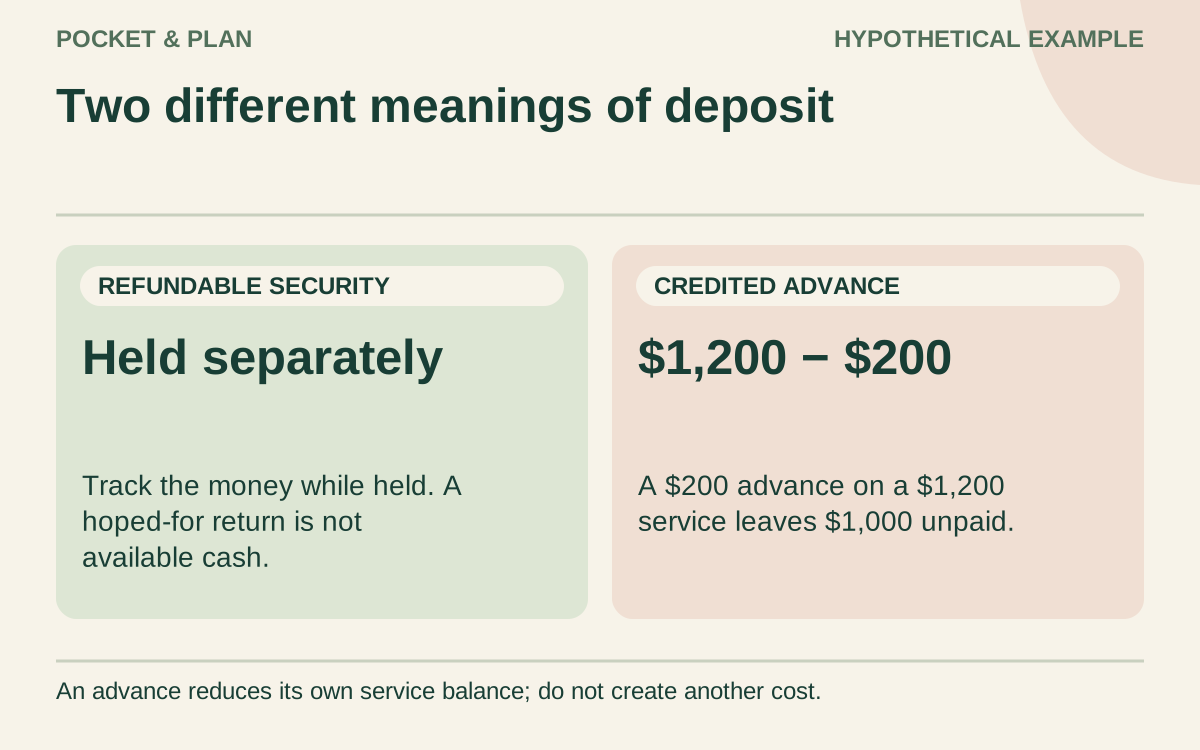
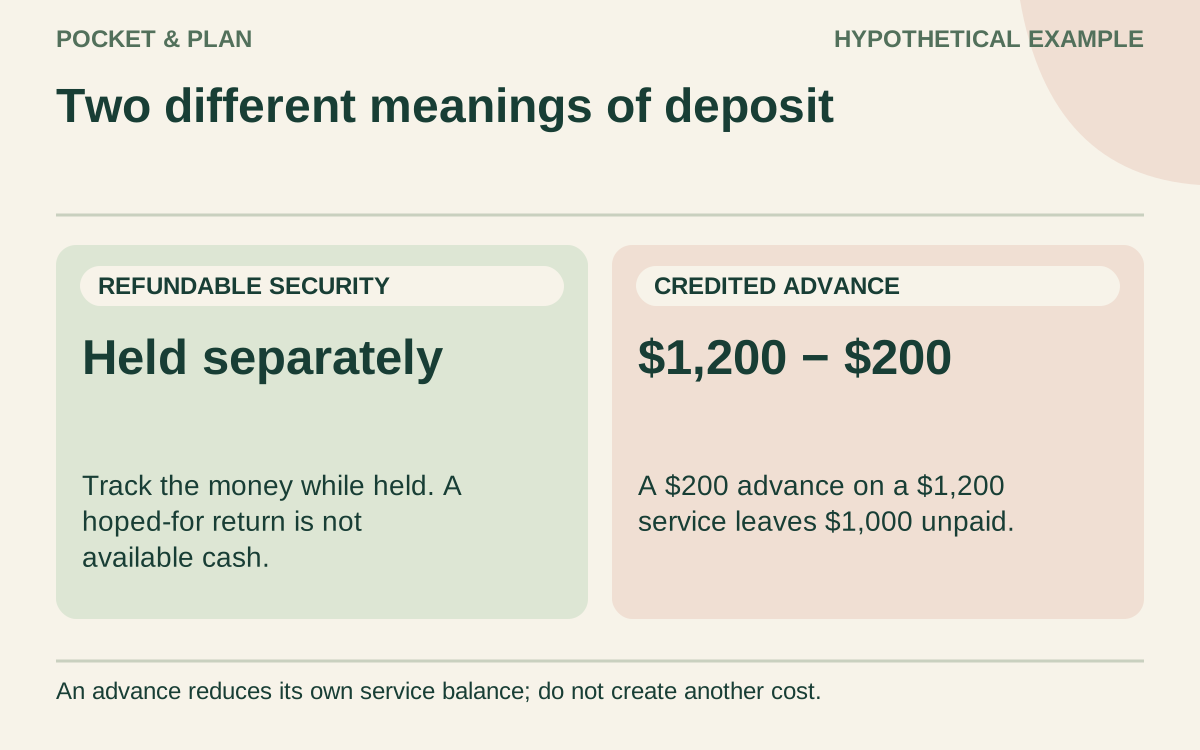
Also distinguish a deposit held as security from an advance payment credited against a service bill. For example, a hypothetical $200 advance credited toward a $1,200 moving charge leaves $1,000 payable. Listing both the full $1,200 and the $200 as separate costs would overstate the total by $200.
Do not use an expected old-home deposit refund to fund a payment due earlier. Its amount and receipt date may be unresolved. Record the refund when it arrives and reconcile any difference separately.
Work through an original cash requirement
Imagine a household plans the following move. Every amount and payment stage is invented, and the $1,200 moving figure is a planning estimate that still needs confirmation.
| Item | Planned amount | Payment stage |
|---|---|---|
| Moving service | $1,200 | Moving day |
| Packing materials | $90 | Before the move |
| Travel and moving-day meals | $210 | Moving day |
| Additional housing overlap | $300 | After the move |
| Utility setup fees | $100 | Before the move |
| Essential setup purchases | $100 | After the move |
| New refundable housing deposit | $900 | Before the move |
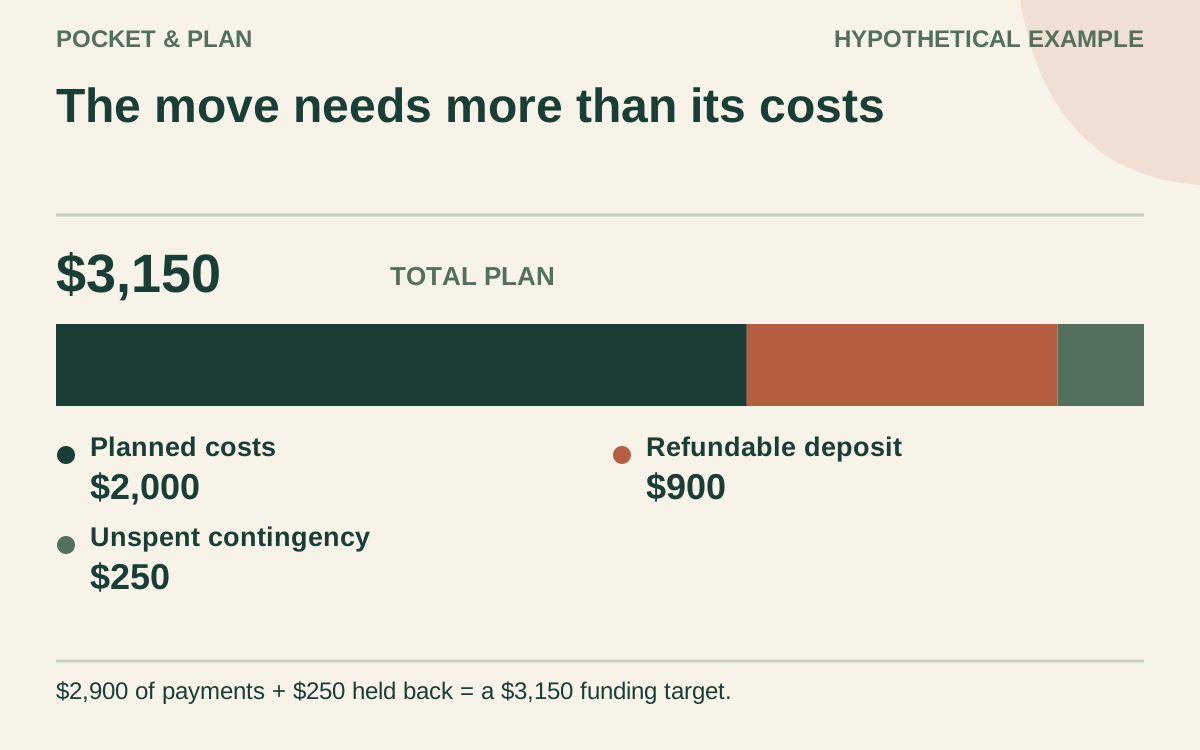
| Unspent contingency reserve | $250 | Keep available |
| Total funding target | $3,150 | Check every deadline |
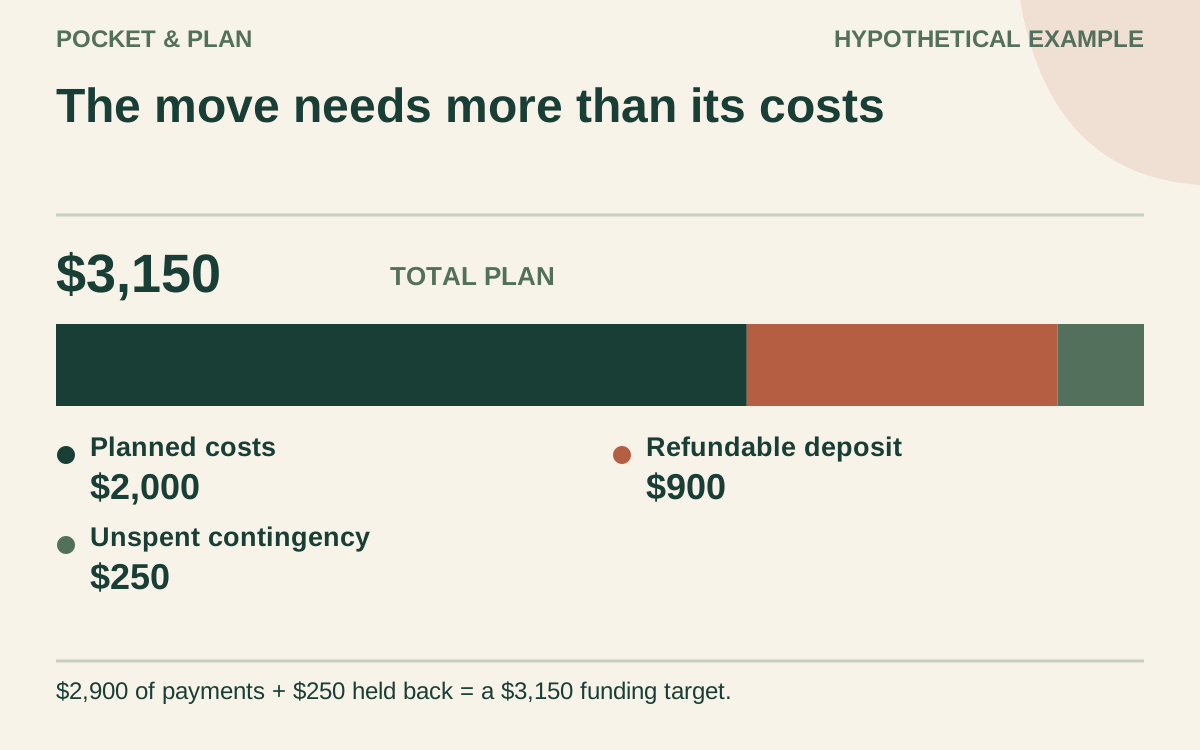
The six planned cost lines total $2,000. Adding the $900 deposit produces $2,900 of planned payments. The $250 contingency raises the funding target to $3,150, but it is not spending unless used.
Under this schedule, $1,090 is needed before the move, $1,410 on moving day, and $400 afterward. Those payments total $2,900. The household also wants the $250 contingency accessible. Final spending will depend on actual charges; the deposit remains recorded separately while held.
If $550 is already saved, the remaining target is $2,600. Four contributions of $650 would reach $3,150, assuming no withdrawals, interest, or fees. That division works only if each required payment is funded by its own date. Four paydays eventually arriving is insufficient when an earlier bill comes first.
Check the calendar before confirming the plan
The CFPB cash-flow worksheet carries each week’s ending balance into the next. Apply that timing check to the move alongside ordinary household obligations. Include only received money as available now; label later income, reimbursements, and refunds as forecasts.
Use the bill tracker for dates and confirmations, and the savings planner for the remaining funding target. The monthly budget planner helps test contributions against everyday bills. Neither calculator verifies a provider’s estimate or predicts a refund.
Close the move with actual figures
Confirm final charges, subtract advances already paid, and keep receipts with the worksheet. Update held deposits and record any returned amounts on their receipt dates. Assign unused contingency deliberately instead of leaving it mixed with unrelated balances.
Finally, revise your regular monthly categories for the new home. New rent, commuting, or utilities belong in the ongoing plan; temporary moving costs should stop when the transition ends.
Sources & verification
These primary reference sources support the guide. Worked examples are our own illustrations, not national averages or reported personal results.
- FMCSA — What is a binding move estimate? ↗Checked September 11, 2026
- CFPB — Creating a cash flow budget tool ↗Checked September 11, 2026
Published · Last substantive update .
Found a factual error or a calculation that needs checking? Suggest a correction by email with this guide's link. The link opens a draft in your email app; you send it yourself. Contact details · Corrections policy