The short answer
Keep the due date, payment plan, and confirmed result in one place so an upcoming bill cannot hide behind an unchecked box.
General educational guide. Sources checked September 10, 2026. Examples are illustrative; amounts should be adjusted to your household. Read our disclosure.
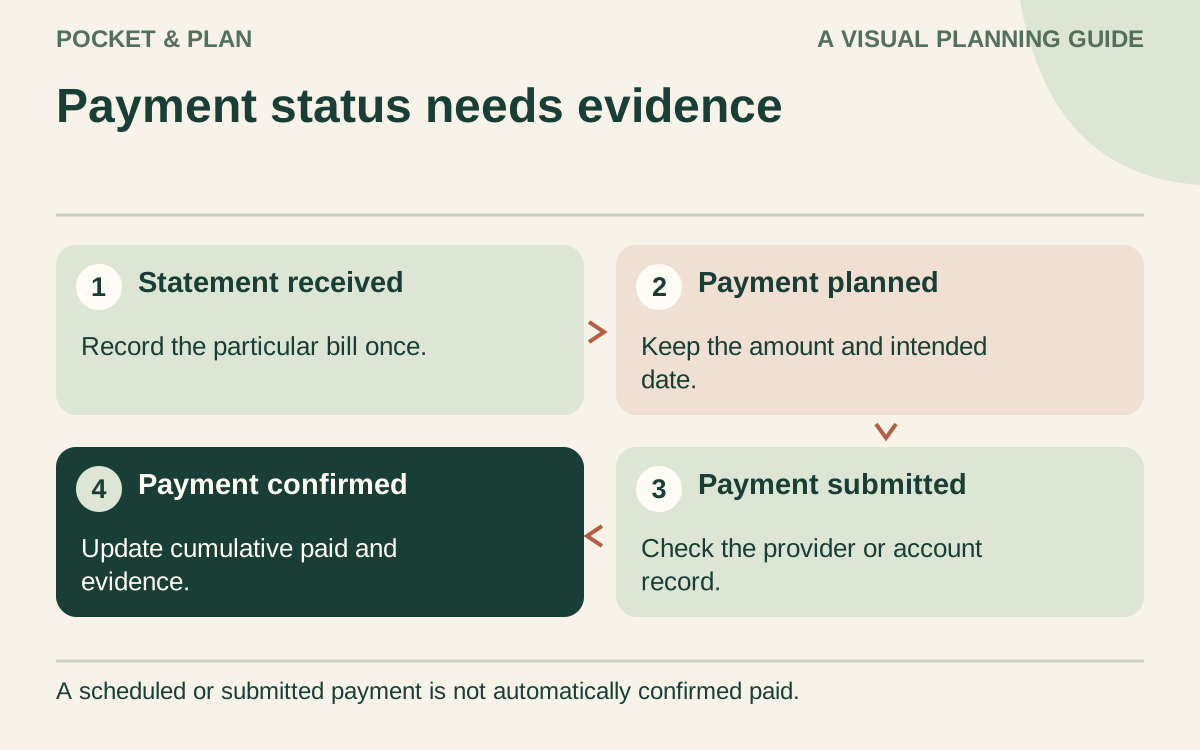
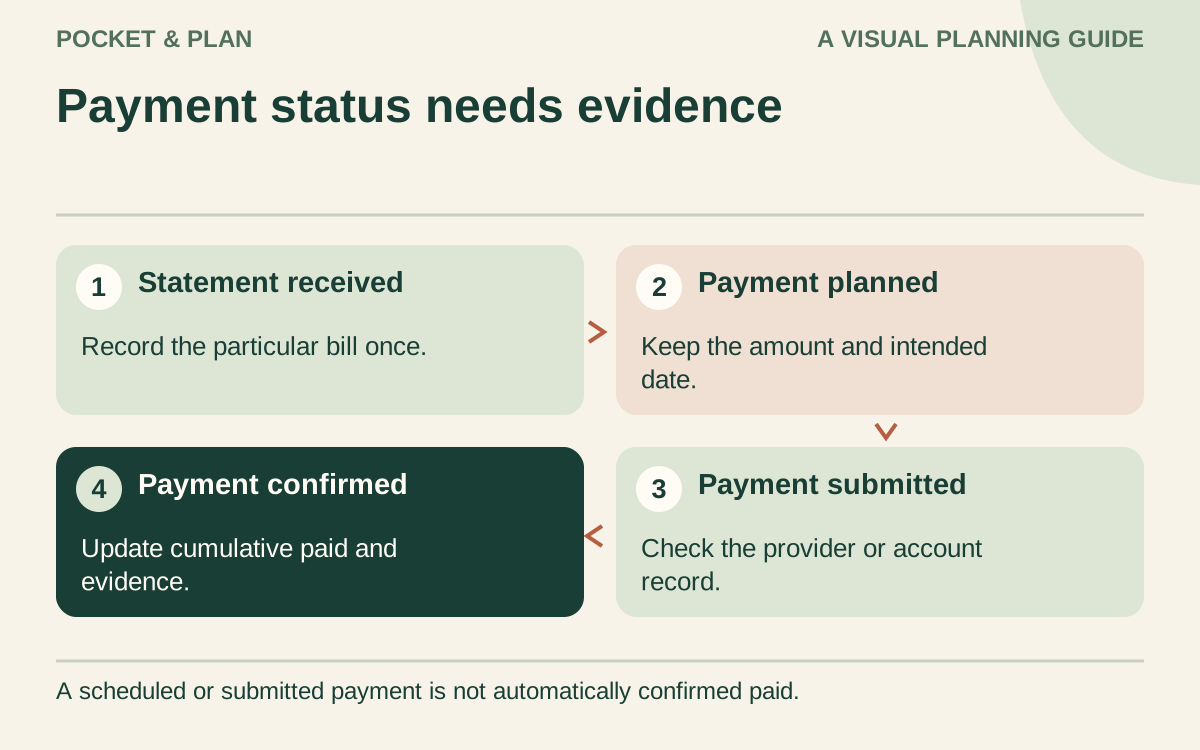
A bill payment tracker works best when it shows three separate things: when a bill is due, how you plan to pay it, and whether the payment actually completed. A single “paid” checkbox can blur those steps. Use a small set of status labels so the next action stays visible.
You can build this tracker in a notebook or spreadsheet. It does not need access to your bank account, and you should leave passwords and full account numbers out of it.
Choose the format for your bill records
Download the Excel bill payment tracker for calculations, the printable bill tracker PDF for paper, or the blank bill tracker CSV for a manual table.
The Excel workbook holds 40 bills. Enter a manual as-of date and use the amber cells for each bill’s reference, actual statement amount, due date, and cumulative confirmed payments. Enter 0 when nothing has been paid, leaving the confirmation date and evidence fields blank. A positive payment also needs its latest confirmed date and an evidence reference, such as the location of a receipt. Scheduling or submitting a payment does not make it confirmed.
Record each statement once. For a partial payment, update that bill’s paid-to-date amount rather than adding the full bill again on another row. Use the amount of the particular bill you are tracking; a credit card’s current bill and its entire account balance are different figures. Keep estimates and planned payment details in a separate planning record until the actual bill is available.
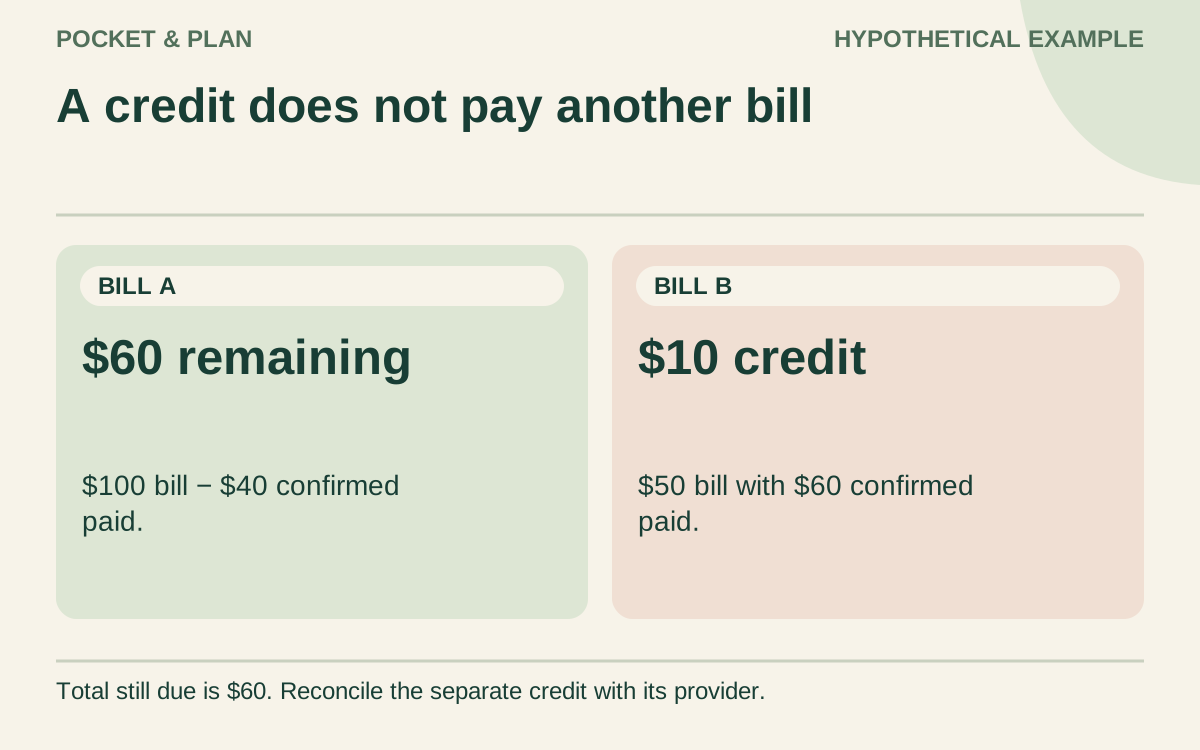
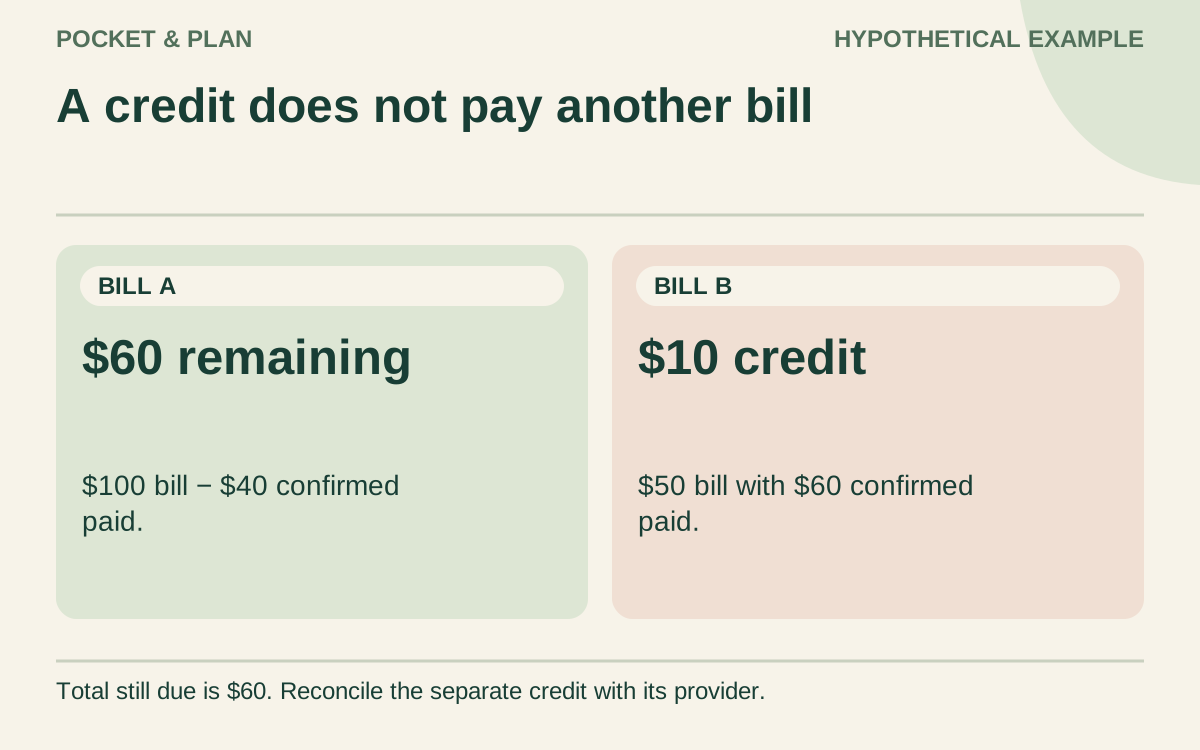
Calculated cells show remaining amounts, overpayment credits, and due-date signals relative to your as-of date. A $100 bill with $40 confirmed paid has $60 remaining. A separate $50 bill with $60 confirmed paid shows a $10 credit. The remaining total is still $60: that credit does not automatically pay the other provider. A credit shown here needs reconciliation with the provider’s records.
Complete any input messages before relying on the totals. An incomplete active row makes the summary unavailable; completely blank rows are unused. Leave the calculated cells intact, and use another copy after the 40 rows are filled. The workbook does not send payments or reminders.
The PDF has eight rows on one landscape US Letter page, with space for confirmed payment dates, evidence, and next actions. Fill and total it by hand; carry unresolved bills forward with their original dates and cumulative payments. The CSV has no formulas and uses simpler planned/actual columns, so you calculate any balances yourself. Neither manual format validates your entries.
Start with the bills you can verify
Collect your current statements and notices. Record the provider, the stated amount, and the due date. Use an estimate label for a variable bill that has not arrived yet, then replace it with the actual amount when available.
The CFPB’s bill-calendar article recommends making the amount and due date visible and checking the calendar regularly. That archived guidance provides the basic calendar idea; the status system below is our practical worksheet design.
Give each column one job
Begin with seven columns:
- Bill: a recognizable provider or expense name.
- Due date: the date shown on the statement.
- Amount: the confirmed amount or a clearly marked estimate.
- Planned payment date: when you intend to send or authorize payment.
- Funding source: an account nickname or assigned paycheck.
- Status: to plan, scheduled, submitted, or confirmed.
- Follow-up: the next check you need to make.
The planned payment date may need to precede the due date. Check the provider’s current processing instructions for your payment method rather than assuming every payment arrives instantly. Keep those timing notes next to the relevant bill.
Work through a hypothetical week
Suppose Riley has three upcoming household bills. The amounts and dates here are invented for illustration:
| Bill | Due | Amount | Current status | Next action |
|---|---|---|---|---|
| Internet | October 8 | $65 | Scheduled | Check completion after payment date |
| Electricity | October 11 | $92 | To plan | Assign funds and choose payment date |
| Phone | October 14 | $48 | Submitted | Check provider confirmation |
The total is $205: $65 + $92 + $48. Riley has reserved $220 for these bills, leaving $15 unassigned within that reserve. If the electricity statement changes from an estimated $92 to $107, the full reserve becomes assigned.
Scheduling the internet payment does not mark it confirmed. Submitting the phone payment also leaves a follow-up step. These labels describe the available evidence instead of treating an intention as a completed action.
Make automatic payments visible too
An automatic payment still belongs in the tracker. Record its expected date and amount, then review the notice and available funds before that date. If the amount can vary, keep an estimate marker until the provider supplies the current figure.
After the payment, check the account activity and provider record as appropriate. Avoid sending a second manual payment solely because the tracker has not been updated; first determine what has already been scheduled or processed.
For recurring services you may want to change or end, the subscription tracker adds renewal decisions and cancellation confirmations alongside the payment dates.
Connect the tracker to each paycheck
Sort upcoming bills by date and match them to the money available before they need to be paid. If several large bills fall in the same period, the monthly total alone may not show the timing problem.
The CFPB budgeting article connects income and spending records with a usable budget. Our biweekly template turns that information into assignments for individual paydays.
When the plan is short, flag the bill for action rather than marking it scheduled without funding. Contact the provider to understand available options if needed; a worksheet cannot establish an arrangement on your behalf.
Close the month and keep the useful notes
At month-end, reconcile confirmed payments and investigate anything still submitted or scheduled. Carry unresolved items forward with their original due dates. Do not let starting a fresh page erase them.
Then copy recurring bill names into the next month, verify the new dates and amounts, and remove commitments that actually ended. If you share household expenses, agree who checks the tracker in your couples budget meeting. A short, reliable review keeps this worksheet useful long after its first month.
Sources & verification
These primary reference sources support the guide. Worked examples are our own illustrations, not national averages or reported personal results.
- CFPB — Bill Calendar: Know what you owe and when it is due ↗Checked September 10, 2026
- CFPB — Budgeting: How to create a budget and stick with it ↗Checked September 10, 2026
Published · Last substantive update .
Found a factual error or a calculation that needs checking? Suggest a correction by email with this guide's link. The link opens a draft in your email app; you send it yourself. Contact details · Corrections policy