The short answer
Check the school's current list, reuse suitable supplies, and fund the items needed first before setting aside money for later school-year costs.
General educational guide. Sources checked September 11, 2026. Examples are illustrative; amounts should be adjusted to your household. Read our disclosure.
Build a back-to-school budget by checking the school’s current requirements, inventorying usable items at home, and assigning each remaining purchase an amount and a needed-by date. Separate essential purchases from optional upgrades, then leave room for costs that arrive after the first week. A complete list is more useful than buying everything labeled “back to school.”
This checklist works for a new school year, a midyear transfer, or a term restart. It uses an invented household example rather than current retail prices or a claim about what every student needs.
Download the school budget worksheet
Choose the back-to-school budget Excel workbook for calculations or the printable school budget PDF for a manual shopping plan.
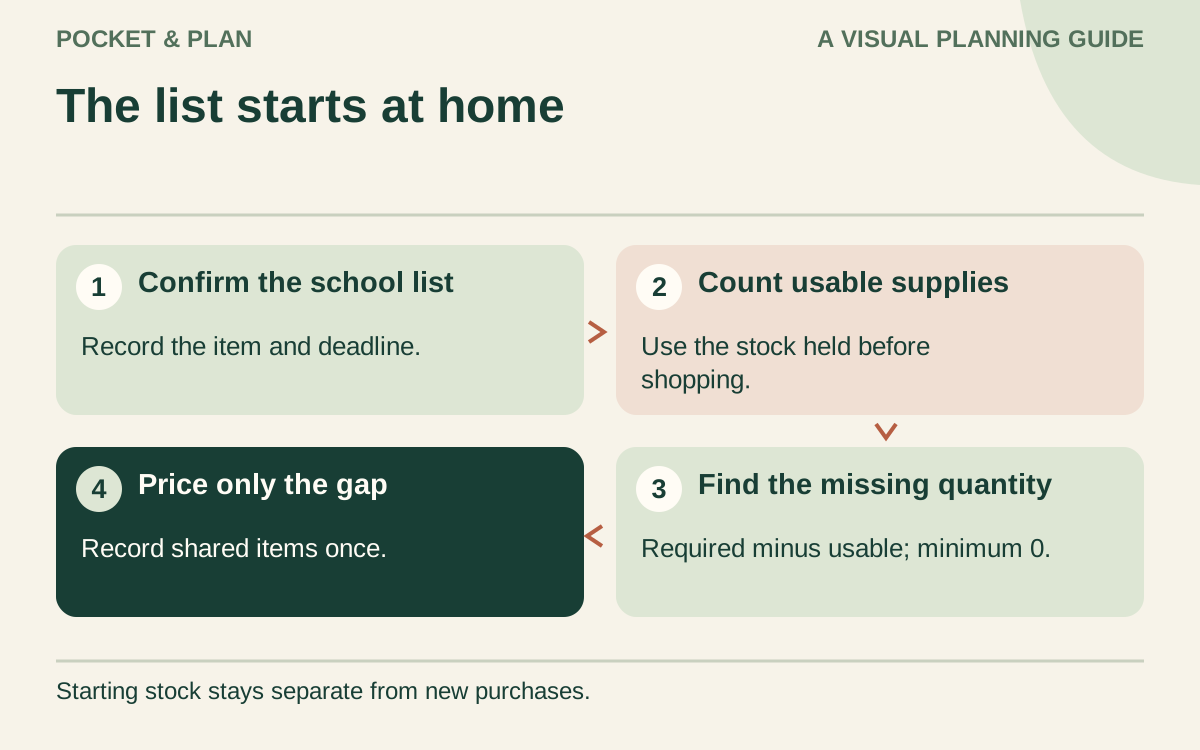
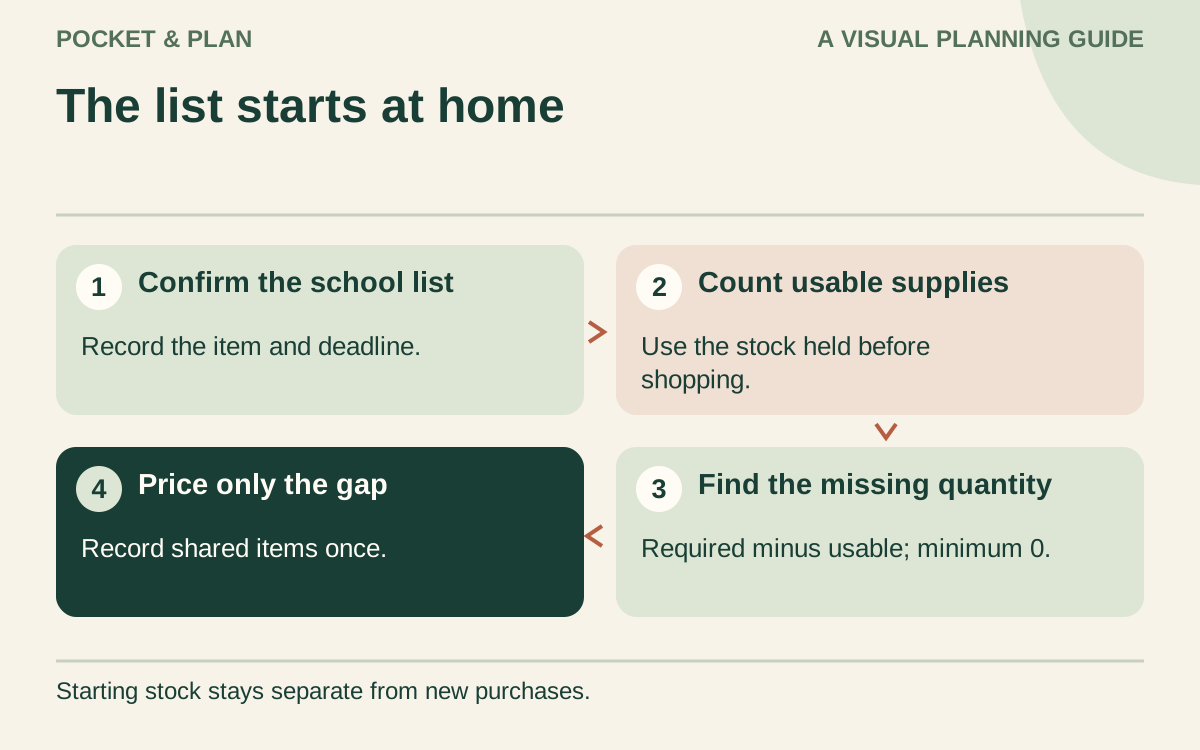
The workbook supports 40 items. Record the item and child or class, its priority, the required quantity, and the usable quantity you already have before shopping. The amount to buy is the required quantity minus starting usable stock, with a minimum of 0. Do not add newly purchased items to starting stock; doing so would change the original purchase gap. Record a shared purchase only once, and use a quantity of one for a single fee or separately priced repair.
Enter an estimated unit price that includes the taxes or charges allocated to that item. Planned cost is quantity to buy times that unit price. If nothing needs buying, a blank unit price and purchase deadline are allowed. The workbook distinguishes school-confirmed needs, household needs, and optional choices; these labels help you review the list and do not verify school requirements for you.
Use the final-actual-total field only after all purchases for that row are complete. It needs a completion date on or before your manual as-of date and a receipt or confirmation note. A completed cost of 0 is valid; a blank final cost keeps the planned figure in use. Keep partial-purchase receipts separately until the row is complete, so an early payment is not mistaken for its full final cost.
At the top, enter the spending limit, later-needs reserve, and unspent buffer. The unassigned amount is the limit minus working purchase costs, the reserve, and the buffer. Each completed row uses its final cost; an unfinished row uses its estimate. A negative result shows the amount by which those assignments exceed the limit. This is a budget check, not a forecast of which payday will fund a purchase.
Follow input messages, edit amber cells, and keep calculated cells intact. Use another copy after 40 items. The PDF has eight rows on one landscape US Letter page for hand calculations, with priority labels and a separate reserve and buffer. Neither version searches shops or places orders.
Start with the school’s list and a home inventory
Get the current list for the correct school, grade, and class. Check specifications before buying an item that must meet a requirement. If something expensive or unclear appears, ask the school what is needed, when it is needed, and whether an existing item is suitable.
The FTC’s school-shopping guidance recommends starting with the teacher-approved list and checking clothing and supplies you already own. Apply that step before choosing a shopping budget.
Make a small inventory with four decisions: ready to use, needs a minor repair, replace, or confirm with school. Check fit and condition, not just whether an item exists. A backpack with a working zipper may need no replacement; shoes that no longer fit need a different decision. Count remaining usable quantities of notebooks, pencils, or other consumables so you buy the gap rather than the whole list again.
Separate requirements, household needs, and choices
Give each proposed purchase one of three labels:
- School-confirmed: a required supply or charge you have verified, with a source and deadline.
- Household need: something necessary for your child’s actual routine, such as replacing an unusable lunch container or arranging transport.
- Optional choice: a preferred design, extra accessory, or activity the household can decide about separately.
A teacher’s request for shared classroom donations may be different from an individual requirement. Confirm the distinction rather than assuming every item has the same priority. If the school provides or lends an item, verify availability before removing it from your plan. Do not count unconfirmed assistance as already received.
The NCUA’s back-to-school guidance includes clothing, technology, and extracurricular activities when taking stock of costs. Use those as prompts to check your own situation, not as instructions to buy a new device or enroll in an activity.
Put a spending limit beside each missing item
Use columns for item, child or class, quantity needed, quantity already usable, amount to buy, estimated total, needed-by date, and paid amount. For a shared purchase, record its cost once and note who it serves.
Include the amount you expect to pay at checkout, with relevant taxes, delivery, or other charges. Keep a source and date beside estimates so you can update them. A discount is useful only if the purchase still meets the requirement and fits the available money.
Discuss optional choices after the necessary list is visible. If a child prefers a more expensive style, explain the available amount and the tradeoff in plain language. Keep the conversation about a specific choice, rather than making the child responsible for solving the household budget.
Check a hypothetical $500 plan
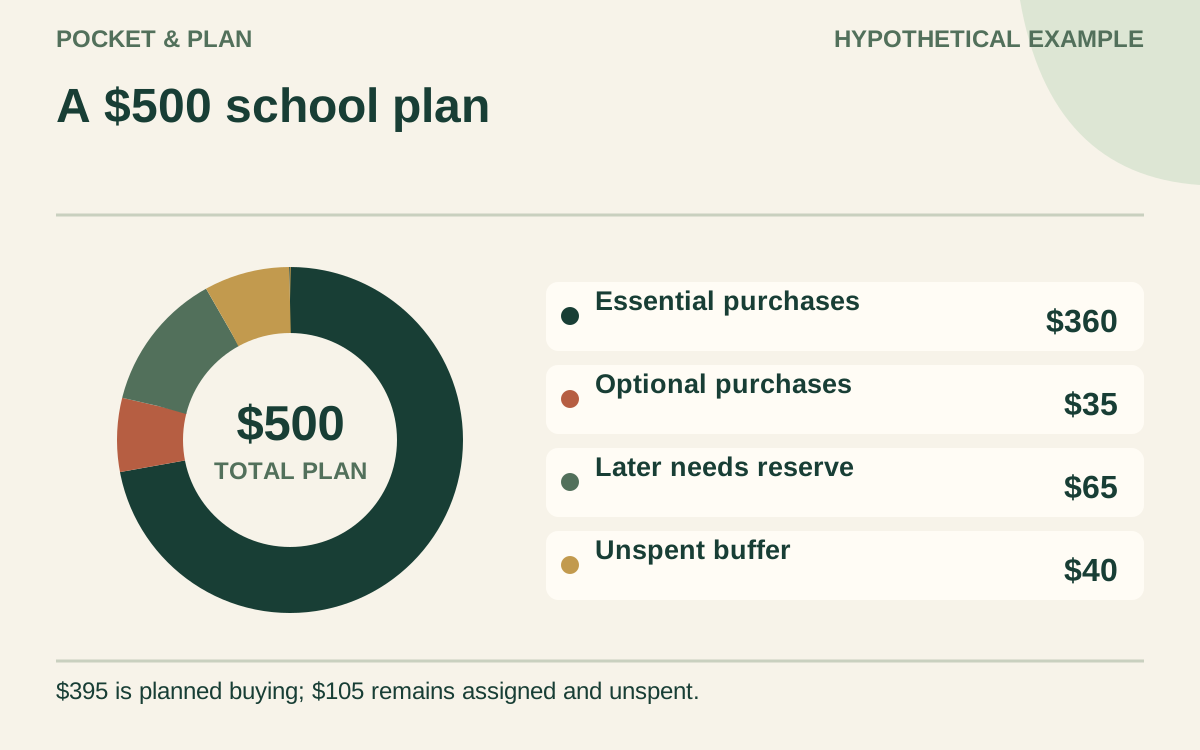
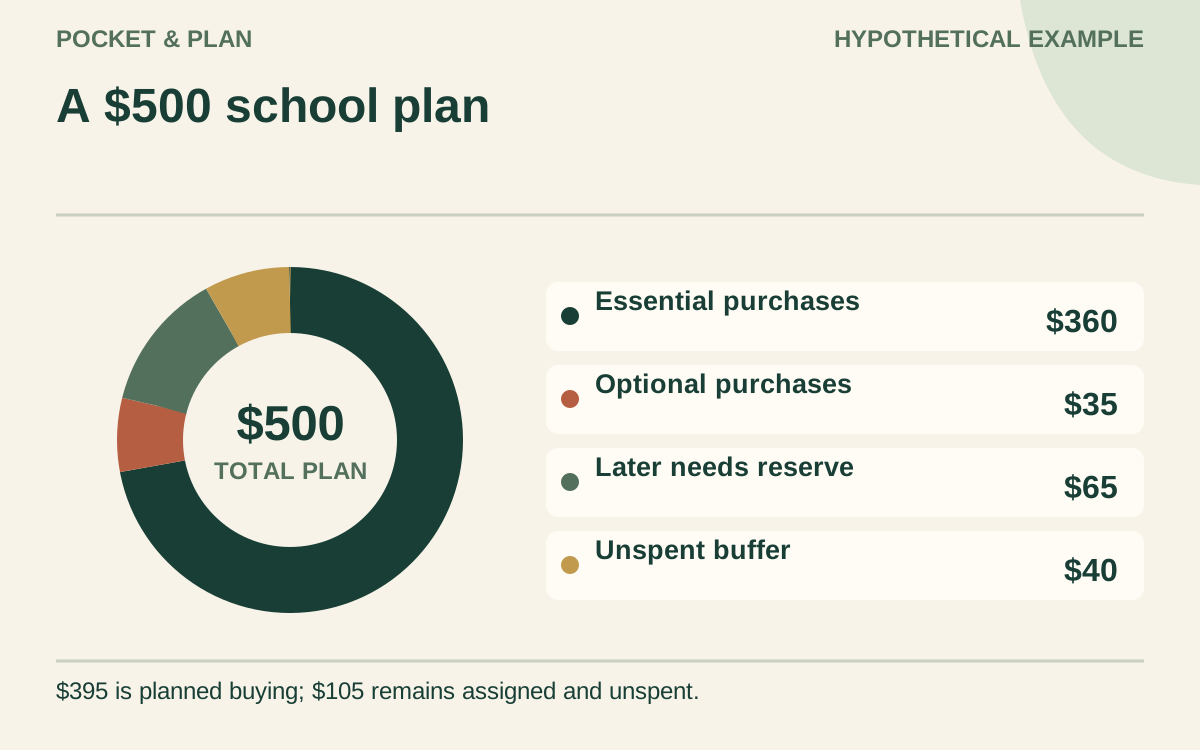
Suppose a household sets a $500 target for one student’s initial purchases and a small amount for later needs. After checking what can be reused, it prepares this plan. These amounts are invented and are not product recommendations or current prices.
| Assignment | Amount | When needed |
|---|---|---|
| Missing required supplies | $85 | Before the first week |
| Replacement shoes | $75 | Before the first week |
| Required clothing gaps | $90 | Before the first week |
| Replacement lunch container | $25 | Before the first week |
| Confirmed school charge | $40 | Before the first week |
| Initial transport costs | $45 | First week |
| Optional purchases | $35 | Only after essentials are funded |
| Reserve for later school-year needs | $65 | Keep assigned |
| Unspent buffer | $40 | Keep available |
| Total target | $500 |
The first six items total $360. Adding $35 of optional spending, $65 reserved for later, and the $40 buffer accounts for all $500. The initial planned purchases are $395; the remaining $105 is assigned money that has not been spent.
If $320 must cover all six essential items through the first week, with no further income before the transport payment, the $360 requirement is $40 short. An expected $180 arriving after those payments does not solve the earlier gap. Recheck purchase timing with the school, revise a feasible item, or confirm another available resource. Dropping later optional purchases alone does not create cash today.
Keep current needs separate from next year’s reserve
After this shopping period, build a separate list of later costs you actually expect: a confirmed activity fee, replacement supplies, or another identified need. Put recurring transport and meal spending in your ordinary monthly budget categories, so they are not counted again as one-time school purchases.
For a separate future school-supply target of $420 with $60 already reserved, the remaining gap is $360. Six monthly contributions before the purchase date would require $60 each. Twelve available contributions would require $30 each. Use the number of contributions that can happen before the deadline, not an automatic annual division.
Use the savings planner to calculate a target and the sinking-fund guide to keep its purpose clear. A future reserve does not replace funding for items needed now. Check contributions against the household budget planner before committing to them.
Finish with receipts and a first-month review
Keep receipts and note return conditions and deadlines; the FTC’s school-shopping checklist also emphasizes checking store policies. Mark a return pending until the refund completes. When it arrives, reverse that purchase’s net cost rather than recording new earnings.
After the first month, confirm which estimates became actual costs, which purchases were unnecessary, and what remains in the later-needs reserve. Keep reusable-item notes for next term. The most useful result is a shorter, more accurate next list, with the money behind it clearly identified.
Sources & verification
These primary reference sources support the guide. Worked examples are our own illustrations, not national averages or reported personal results.
- FTC — School shopping can be a teachable moment ↗Checked September 11, 2026
- NCUA — Are You Ready for Back-to-School Season? ↗Checked September 11, 2026
Published · Last substantive update .
Found a factual error or a calculation that needs checking? Suggest a correction by email with this guide's link. The link opens a draft in your email app; you send it yourself. Contact details · Corrections policy